Biometric attendance software for Windows PCs.
The PCs your team already uses become the time clock.
Employees check in by face with the PC’s own webcam. No terminals to buy and no cards to hand out: NCheck runs on Windows and connects to your NCheck server, in the cloud or on your own servers.
Windows 8 or later, 64-bit · 30-day free trial on paid plans · NIST-ranked algorithms




Attendance on the Windows PCs you already own.
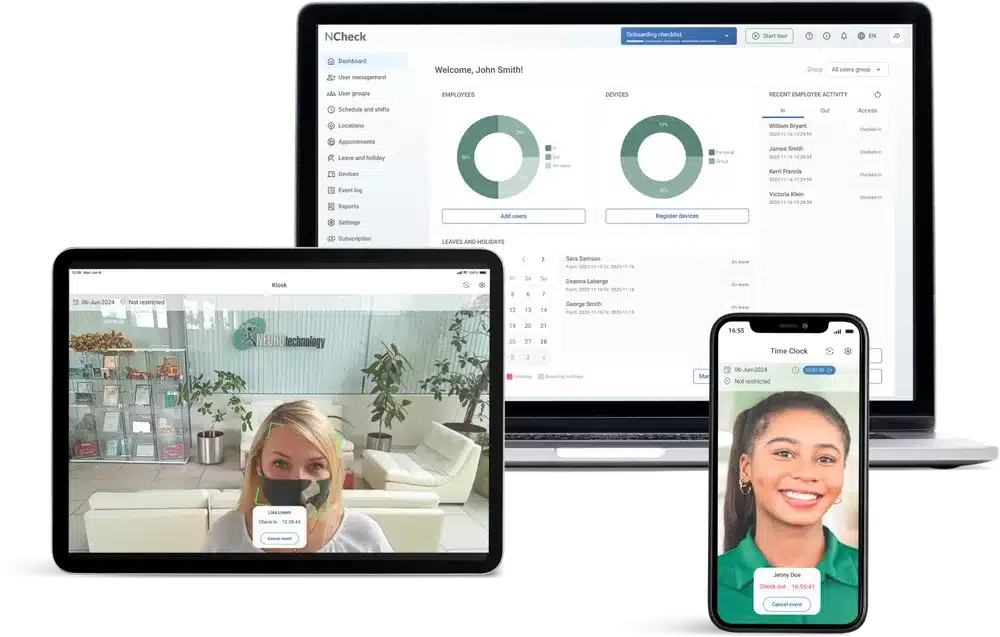
Biometric attendance software for Windows turns each PC into a check-in point. The employee looks at the webcam, NCheck matches their face to the one enrolled on their account, and the time, method and device are recorded. A face can’t be lent to a colleague, so buddy punching stops without anyone standing at the door.
It suits offices, call centres, back offices and reception desks, anywhere people already sit at a computer. A company with hundreds of PCs gets a time clock on every desk without a hardware project.
Install NCheck on Windows
Download the Windows client, connect it to your NCheck server and pick the camera. Any webcam Windows can use works, built-in laptop cameras included.
Enrol each employee once
A photo taken at the PC becomes an encrypted template, and every later check-in is matched against it.
Check in with a glance
A match takes under a second. On Standard and Premium, liveness detection runs first, so a photo or a video of someone else is rejected.
A PC for each employee, or one PC for everyone.
NCheck has two Windows apps. Choose per site, and mix them if you need to: both write to the same attendance record.
| App | Where it runs | Best for | Price |
|---|---|---|---|
| NCheck Attend | Each employee’s own Windows PC | Office staff who check in at their desk | Free, unlimited installs |
| NCheck Admin | A shared Windows PC or tablet at the entrance (a station) | Teams arriving together; fingerprint or iris scanners; sites with weak internet | €95 one-time per device |
Attend and Admin can’t be installed on the same PC. More on personal devices and shared stations.
A record both sides can rely on.
Verified check-ins protect employees as much as the employer: hours are recorded as they were worked, nobody can clock in for someone else, and there is nothing to argue about on payroll day.
Cloud, or a server on your own Windows machine.
Use NCheck in the cloud and be live the same day, or install the NCheck server on a Windows machine in your own network. On-premises keeps attendance data inside your building and runs without the internet. The server also runs on Linux as a Docker image.
System requirements for Windows.
| Component | Windows | Memory | Disk | Also needed |
|---|---|---|---|---|
| NCheck Attend (employee PC) | Windows 8 or later, 64-bit | 8 GB RAM | 1 GB free | Webcam |
| NCheck Admin (shared PC or station) | Windows 8 or later, 64-bit | 8 GB RAM | 1 GB free | Webcam; fingerprint or iris scanner optional |
| NCheck server (on-premises) | Windows 8, Windows Server or newer, 64-bit | 8 GB RAM | 1.5 GB free | Java 21 or later; or Linux via Docker |
See every tested camera and scanner on the supported devices page, and get the installers from downloads. Setting up on tablets instead? See attendance on tablets.
“Face recognition works well with a normal camera too. Convenient, cost-effective and highly accurate — face, fingerprint and iris.”

Simple pricing, per employee.
Free for up to 5 employees. Paid plans are billed per employee, per month, and yearly billing saves 20%.
Free
Forever, up to 5 employees. Face check-in, GPS, timesheets & reports.
Standard
+ Fingerprint, unlimited employees, RFID & barcode, access control, on-premises option.
Premium
+ Iris, visitor queue & visit notes, custom feature extensions.
Frequently asked questions.
Do we need special hardware for attendance on Windows PCs?
No. Any webcam Windows can use works, including the camera built into most laptops. Fingerprint and iris scanners are optional, and the supported devices list shows the tested models.
Is the NCheck app for Windows free?
The NCheck Attend client is free, with unlimited installs on any plan. You pay per employee for the plan you choose, and the Free plan covers up to 5 employees. The NCheck Admin app for a shared PC or station is a €95 one-time licence per device.
Can employees check in on their own work PCs?
Yes. Install NCheck Attend on each employee’s PC and they check in by face with its webcam when they start and finish work. Only the check-in is recorded: there is no screen recording and no activity tracking in between.
Can someone check in with a photo held up to the webcam?
Not on the Standard and Premium plans. Liveness detection checks that a real, live person is in front of the camera before a check-in is recorded, so a printed photo or a video on a phone is rejected. See liveness detection.
Does the NCheck server run on Windows?
Yes. The on-premises server runs on Windows 8, Windows Server or newer (64-bit) with 8 GB RAM and Java 21 or later, or on Linux as a Docker image. It comes with a 30-day free trial; see the downloads page.
Does it work without an internet connection?
With NCheck On-Premises the whole system runs inside your own network, so check-ins do not depend on the internet. The NCheck Admin app also keeps working offline and syncs when the connection returns.
What about employees who do not want to use their face?
They can check in with a card (RFID), a barcode or QR code, or manual ID on the same account, so you can offer an alternative where the law asks for one. Our compliance pages explain the rules by region.
A time clock on every desk,
running by tomorrow.
Free for up to 5 employees. 30-day free trial on every paid plan.